Since I get a lot of email – sometimes 100 emails a day, filing away each email manually can become an overwhelming chore. If I were to let it go for a couple days, then I’d be more apt to procrastinate than to keep a clean email box.
Fans of David Allen know one of his principals is to keep a clean inbox. Having tons of emails staring you in the face doesn’t feel good. The more it builds, the more you put off handling the email. Some people just give up and delete months and months of old emails. Others plop them all into an “overflow” folder and hope the search function of Google Desktop or Lookout can compensate.
Well, there is a better way…
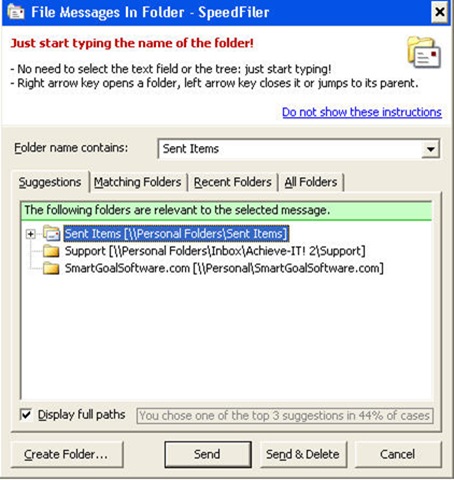
Two years ago I reviewed a little Outlook add-on called SpeedFiler. It’s goal was to make it easy and fast to file emails so they could be easily retrieved. Not to rehash what I wrote before, but one of the best features of it back then and still today is when you send or respond to an email it files it right that second!
So right off the bat, it saved me loads of time. My tendency, for some darn reason, is to reply to an email and leave the original email sitting in my Inbox. Maybe I forget to go back and deal with the original, maybe I subconsciously want it sitting there forever as a testament to the great reply I wrote… who knows?  But having an already responded to email sitting in my Inbox 2 months later is no fun. So right from the start, Speedfiler started cleaning up my Inbox.
What If My Inbox Is Already Full?
Here’s where Speedfiler leapfrogs ahead of Outlook’s own filing algorithm. When you select an email or group of them, and hit shift+ctrl-v on your keyboard, you’ll see a list of your folders. Now with Speedfiler all you have to do is start typing the name of the folder. Within 1 or 2 letters it will have the one you are looking for ready and waiting for you to drop in your emails.
With Speedfiler 2.0, they’ve made it even quicker. There is a new feature called one-click filing where you don’t even have to hit the ctrl-shift-v shortcut key. The way it works is it analyses the email and then makes a suggestion based on the contents of the email. Click the suggestion button and it’s filed.
In the picture below, someone responded to one one of my newsletters, and without any other intervention, Speedfiler picked up on where it needed to go. Click and it’s filed!
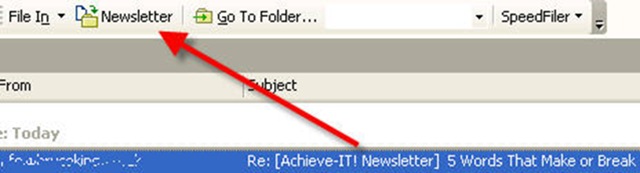
One click filing – what could be easier?
Without Speedfiler, you may be able to keystroke your way to the folder, but not if the folder is nested within personal folders that are closed. Picture each morning having to go in and set up Outlook in a specific way just to file your messages without Speedfiler. You’ll see that the time adds up.
Improvements from version 1.0 to 2.0
There is an improved folder selection. Speedfiler was always pretty good at sensing what folder you were trying to find, but now it narrows the “possible” folders down to 2 or 3 folders. If for instance I am filing support @ persistenceunlimited vs. support @ smartgoalsoftware, it narrows it down to both support folders instead of all folders under both domains.
Like I said, I’ve been using Speedfiler for 2 years now and happy with the results. There was a problem with the 1.x versions where on launching Outlook, it scanned through all the folders which took up to 30 seconds to go through my 75+ folders. This was an annoying wait occasionally when I just wanted to send a quick email.
But with the latest version Speedfiler now launches almost instantly! According to the documentation, the scanning of version 2.0 occurs in the background, so my one and only complaint is now gone.
Wishes
My only request for a future build is unnecessary, but fun and satisfying for productivity conscious people like me. Currently, Speedfiler shows a stat of how many emails it has filed for you. I’d like it also to show an estimated time it has saved. Also to give an option of putting in an hourly wage so you could see how much money it saves you over time.
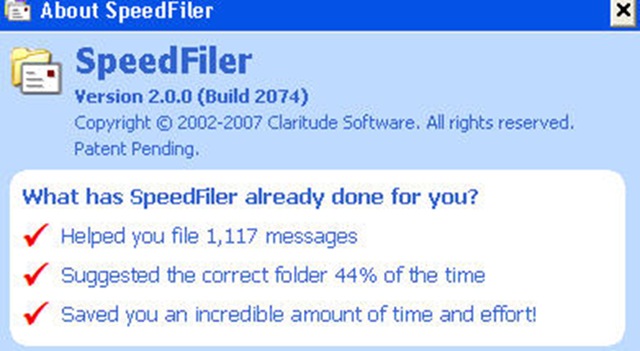
Being able to see in real dollars how much money it saves would be an added motivator to have “Speedfiler” time each day. Also, it would be a way that a user could justify the purchase to their company. Since time is money, and Speedfiler saves plenty of time, it would simply be nice to see how much money it adds up to be.
My Recommendation
I’ve been using Speedfiler on my computer for 2 years now and find it an indispensable program. My former complaint with it launching slowly is gone. I’d say if you find yourself with tons of emails that clog your inbox, you owe it to yourself to at least download the free trial. Use it for a day or two. I am confident you’ll feel the thrill of a clean inbox again.
This just in: Discount on SpeedFiler for Achieve-IT! Readers!
Additionally, I’ve negotiated a discount for all readers of Achieve-IT! blog. You can get a $5 discount off either the Professional or Standard Versions
Buy Professional (Save $5 with coupon code SF520BL valid until Aug 20)
Buy Personal (Save $5 with coupon code SF520BL valid until Aug 20)




{ 12 comments }
Hi Brad
Great review. I counted I have had over 800 e-mails in the last 7 days, most of it junk mail. this sounds the perfect tool for filing to the correct folders.
Hi,
you can get all this for free with Mozilla Thunderbird and the Nostalgy Add-On.
Falko, thanks for the suggestion. I know Thunderbird has it’s strengths, but I am pretty well strapped into Outlook. Others may want to give it a try though.
I have been testing Speedfil in our company and it works great for filing mails in folders in your own inbox.
However we are planning to use Public Folders on our Exchange server, and the tests we did with Speedfiler so far shows that it has serious problems finding newly created public folders.
Sometimes it takes up to 2 days before a new public folder is searchable in Speedfiler.
(We have activated the Speedfiler option to include Public Folders)
If anyone have any ideas how to reindex /rescan the folders in Speedfiler I would be very happy!
Thanks in advance!
hmm… I’ll ask the developer. Personally, I don’t use the public folder feature of Speedfiler, so I don’t know for sure.
public folders on exchange are a plague and not what you expect in terms of functionality, speed, etc. dont expect a similar experience to what you get on your exchange mailbox.
i suggest a different type of shared tool such as shared mailboxes (still cumbersome) or collaboration platforms such as ‘basecamp’.
my 2 cents. good luck.
on speedfiler: its generally been great. i would say 90% satisfaction esp with outlook 2007.
I like SpeedFiler, but I would like to share that I’ve run into a serious performance issue with SpeedFiler, and Claritude ignores my request for help to find the cause. I’m the poster child for needing this product, with 4500 folders accessed using IMAP to a Dovecot server. When SpeedFiler guess the right folder, it’s instanteous, but if I have to type part of a folder name for a search, I have to wait 2 minutes with Outlook CPU utilization spiked at full the whole time.
SpeedFiler tends to guess right, but every time I don’t see the right folder in the suggestions, I cringe knowing that I’ll have to wait 2 minutes for it to find the right folder. I keep hoping that a future revision will correct this behavior.
I strongly encourage anyone considering SpeedFiler to test it in thoroughly first. This problem did surface during my evaluation, but I’ve chosen to live with it for the advantages when it does work.
4500 folders is a staggering amount of data for any 3rd party plug in to deal with. I’d also question from a productivty standpoint if that may be harming your workflow.
But thats a topic for another day.
Have you tried compressing your pst? Inbox repair might help the speed a bit too.
I have tried compressing the pst, deleting the pst and allowing Outlook to recreate, rebuilding the IMAP indexes (even though there is no noticeable network traffic during the two minute delay), and anything else that I could think of that is under my control. Alas, nothing has helped.
Prior to Speedfiler, I just used ctrl+shift+v, Outlook would produce the folder list in 1-2 seconds, I would type part of the name, and save. I set the inbox as my default save folder, so I could select original and reply and file them at once. It works ok as a work-flow, but Speedfiler cuts down processing when it guesses the folder correctly, and as it learns and associates.
I honestly don’t understand the two minute pause when it searches for folders. What makes it more odd is that there are a handful of folder names that it will match almost instantly when I type them.
As for the 4500 folders, it is one folder per institution that I deal with, and it’s quite helpful when going back to prior conversation, so rearranging isn’t an option.
Falko, Nostalgy doesn’t have the “File after send” feature. Cause otherwise, I would go for Thunderbird, honestly!
Falko – I’m also trying to find a Thunderbird alternative for Speedfiler (so that the clients orginal email AND my email reply are filed in their folder) can you recommend any? Joe
I use SpeedFiler with my Outlook 2003 and it is very good.
A customer of mine is using Thunderbird with at least 100 folders but until now I couldn’t find anything like SpeedFiler for Thunderbird.
Nostalgy is not the same as SpeedFiler is Falco Unfortunately
{ 4 trackbacks }